Good to Know — This page is an independent help guide showing how the in-app Trial Program operates. Spots are limited, and the app picks winners automatically.
Want Free Outfits Delivered to Your Door? Start Here
Getting selected for free items isn’t just pure luck—it comes down to having a ready profile. Most shoppers get skipped because they leave their size info blank, apply right before the timer runs out, or post blurry pictures afterward.
Follow three simple habits to stand out: add your real body measurements first, apply on the exact day new items appear, and write clear reviews with bright daylight photos.
What Is the Free Trial Center?
It is an official feature inside the shopping app created to collect honest feedback from real customers. If you get chosen, the item is mailed to your home for free, and you simply post a review sharing your thoughts.
The product list resets once a week. The system chooses winners by checking your profile details, how fast you apply, and your past review record.
What Kind of Items Can You Get?
There is a big mix of products across different sections of the app, ranging from everyday outfits to handy household goods.
Alongside tops, dresses, jeans, and sweaters, you will frequently see skincare items, makeup pouches, closet organizers, and cute room decor.
Popular Categories to Browse:
• Everyday Fashion: Tops, shirts, pants, jackets, and sleepwear.
• Beauty & Skincare: Makeup, brushes, face creams, and beauty tools.
• Style Extras: Bags, necklaces, earrings, belts, and sunglasses.
• Home Essentials: Storage bins, pillow covers, and kitchen helpers.
1
Open the Free Trial Menu
Launch the app on your phone. Tap Profile at the bottom, look under More Services, choose Other Services, and tap Free Trial Center to see what is up for grabs.
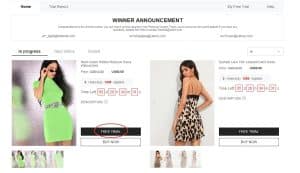
Where to find the weekly free product list
2
Choose Up to 3 Products Weekly
You get 3 free picks every week. Tap on the item you want, pick your right size, and check that your home address is spelled right before hitting submit.
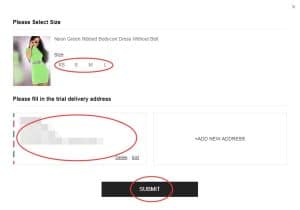
Size selection and address check screen
3
See If Your Request Was Picked
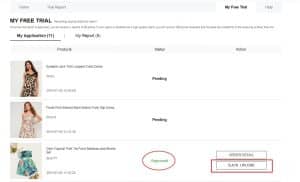
Results usually take around 7 days. Check the “My Free Trial” tab. If it says “Approved”, your package will ship soon. If it says “Not Approved”, another shopper won that item.
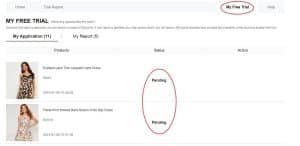
Tab where you view your application results
4
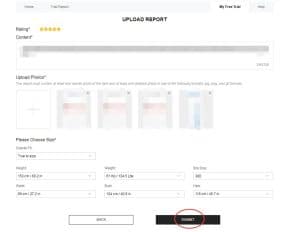
Test the Item and Write Your Review
When your package shows up, try on the product and look over the quality. Write an honest review and attach clear photos (1 wearing it and 2 showing close-up fabric details). You have 10 days to finish this under “My Report”.
Page for uploading your review and clear photos
5
Collect Points for Future Orders
Check My Report to see if your review passed. Each accepted review gives you 20 points. If your post is rated as a “Quality Report”, you earn 100 bonus points.
Reward points added to your account
6
Edit Your Review If It Needs Fixes
If your review is marked Rejected, don’t worry: you get 1 extra try to fix it. Open the report, tap Resubmit, add a few more sentences, upload brighter photos, and send it again.
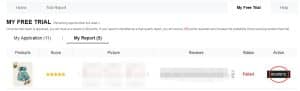
Screen to edit reviews that need improvements
Easy Ways to Get Your Review Approved:
Use these quick tips so your report passes smoothly:
• Talk about how soft the fabric feels, how comfy it is, and the overall fit.
• Say whether the size you picked matches the app’s size chart.
• Take your photos near a bright window during the daytime.
• Share practical details that help other buyers make smart choices.
Quick tip: Every approved basic review gives 20 points. Writing a detailed, standout post earns 100 extra points.
Simple Mistakes to Watch Out For
Avoid these habits to keep your account in good standing:
❌ Leaving your body size measurements blank in your profile
❌ Using a delivery address located outside your store country
❌ Applying right before the weekly product list resets
❌ Typing one-word reviews or attaching dark, blurry photos
❌ Letting the 10-day deadline pass without posting your review
❌ Ignoring a rejected review instead of fixing and resending it
❌ Making extra accounts to try getting more free items
“I applied for weeks with zero luck. Then I updated my profile: measured my waist and bust with a tape, saved the numbers, and applied right after the weekly list refreshed. The next week, I won a super cute top!”
— Emily T., regular shopper ⭐⭐⭐⭐⭐
Key Program Rules
• Each account can request up to 3 items per week.
• Your shipping address must be in the same country as the store.
• Standard delivery on selected free items costs nothing.
• You have 10 days after your package arrives to post your review.
• If a review is rejected, you get 1 chance to fix and resend it.
• Using duplicate accounts will lead to a permanent ban.
• Skipping reviews hurts your chances in future weekly rounds.
Common Questions
Is shipping really 100% free?
Yes, standard shipping on awarded free trial items has zero cost.
How many items can I pick per week?
You can request up to 3 clothes or items every 7 days.
What if my report gets rejected?
Open My Report, tap Resubmit, add more helpful details about the item, upload brighter photos, and send it again.
Do I have to return the item after reviewing it?
No, once you submit your review, the product is yours to keep.
Available spots fill up quickly because many shoppers apply each week. To improve your odds, check the app on reset day, apply early, and post clear reviews.
Visit the Free Trial Center
See what items are live today, send your 3 weekly requests, and track your status inside the app.
OPEN TRIAL CENTER
This button opens the official trial section directly in the app.